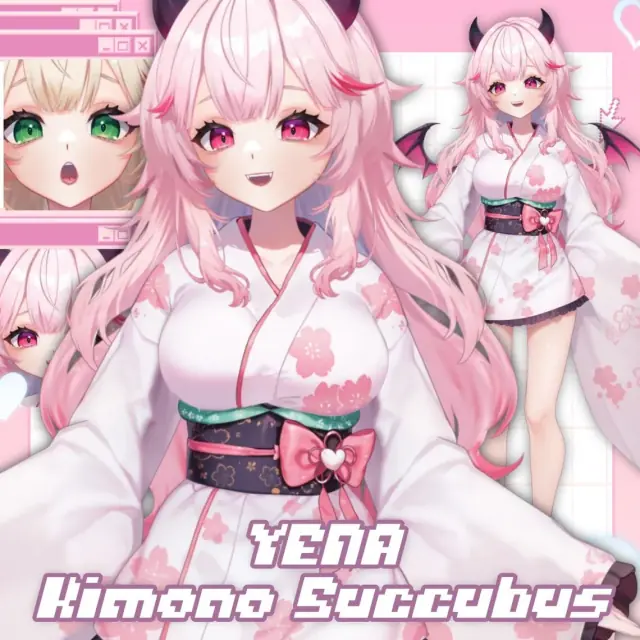
yena – kimono outfit succubus vtuber model | full body & customizable
Live2D · Avatar
Enter the access code to open it in the archive.
⟡。:゚☆✧ yena the succubus nurse vtuber model – fully rigged for vtube studio ✧☆:゚。⟡ a super cute fully rigged live2d model made for vtube studio~ yena comes with lots of toggles, outfit color options, and more! <3 。:゚☆。 features 。☆゚:。 ❥ smooth, natural movement – fluid rigging and reactive expressions ❥ tons of expressions & eye styles – show off all the moods ❥ outfit & hairstyle color toggles – customize vena’s style anytime ❥ chibi mode toggle for extra cuteness ❥ super easy vtube studio setup 。:゚☆。 expressions & toggles 。☆゚:。 ✔️ blush ✔️ closed eyes ✔️ crying ✔️ empty eyes ✔️ squeezed eyes 。:゚☆。 clothing & appearance toggles 。☆゚:。 ✔️ clothing colors (3 options) ✔️ eye colors (3 options) ✔️ hair colors (3 options) ✔️ accessory colors (3 options) ✔️ boba size - big & small 。:゚☆。 accessories & extra features 。☆゚:。 ✔️ chibi mode toggle ✔️ hat toggle ✔️ horns toggle ✔️ wings toggle ⟡。:゚☆✧ how to set up yena in vtube studio ✧☆:゚。⟡ ✦ step 1: import the model open vtube studio, go to model selection, and click import model. add the yena model files into your vtube studio folder. ✦ step 2: load the model find yena in the model selection menu, then adjust her position, size, and angle to fit your stream layout. ✦ step 3: assign hotkeys & toggles open settings in vtube studio, go to expression settings, and assign hotkeys for all yena’s cute toggles~ stream deck works too! ⟡。:゚☆✧ customization & recoloring ✧☆:゚。⟡ you can customize yena’s hair, clothes, and eye colors! just edit the texture files in an image editing program like photoshop or clip studio paint, and reload the updated files in vtube studio~ easy peasy! 。:゚☆。 important notes 。☆゚:。 ✧ for personal use & content creation – all revenue you make is yours ✧ no reselling or redistributing the files ✧ credit is sweet but not required